
Last updated: October 2026
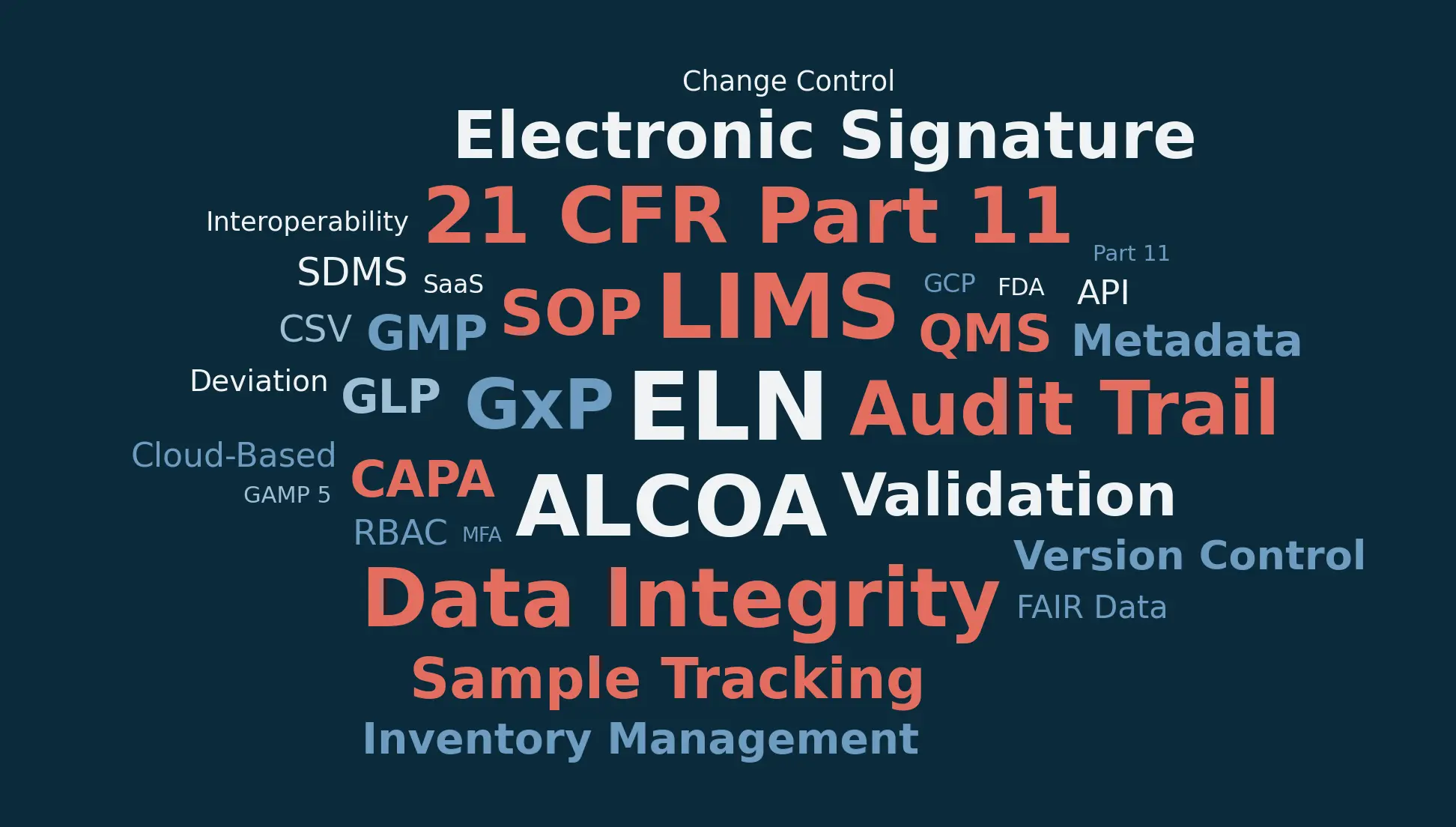
If you've spent any time evaluating lab software, you've drowned in acronyms by now. ELN, LIMS, SDMS, ALCOA+, Part 11, CSV, CSA. Vendor pitch decks don't help: they throw these around like everyone already knows what they mean.
We put this together as the reference we wish existed when we started. It's organized by topic instead of alphabetically. Why? Because knowing what "ALCOA" means is more useful when you can read it next to "audit trail" and "electronic signature" than when it's wedged between "aliquot" and "API."
Bookmark it. You'll be back.
Terms with their own detailed page
- Electronic Lab Notebook (ELN): the software that takes over from the paper notebook for documenting experiments.
- Laboratory Information Management System (LIMS): follows each sample from receipt, through testing, and into storage.
- Lab Inventory Management: knowing where every lab material is stored and how much of it is left.
- Sample Tracking: the record of a sample's life, from receipt or creation to disposal.
- Chain of Custody: every hand a sample passed through, with dates and locations.
- Witness Signature (Countersignature): a second person signs to confirm they reviewed a notebook entry.
- Standard Operating Procedure (SOP): written instructions so a task gets done the same way every time.
- Data Integrity: whether data stays complete, consistent, and accurate over its whole lifecycle.
- ALCOA+: nine attributes regulators use to judge whether data can be trusted.
- Audit Trail: the computer-generated, timestamped log of every change to a record.
- Electronic Signature: what it takes for a signature on an electronic record to count under Part 11.
- 21 CFR Part 11: the FDA regulation covering electronic records and electronic signatures.
ELN, LIMS and Related Lab Software
Electronic Lab Notebook (ELN)
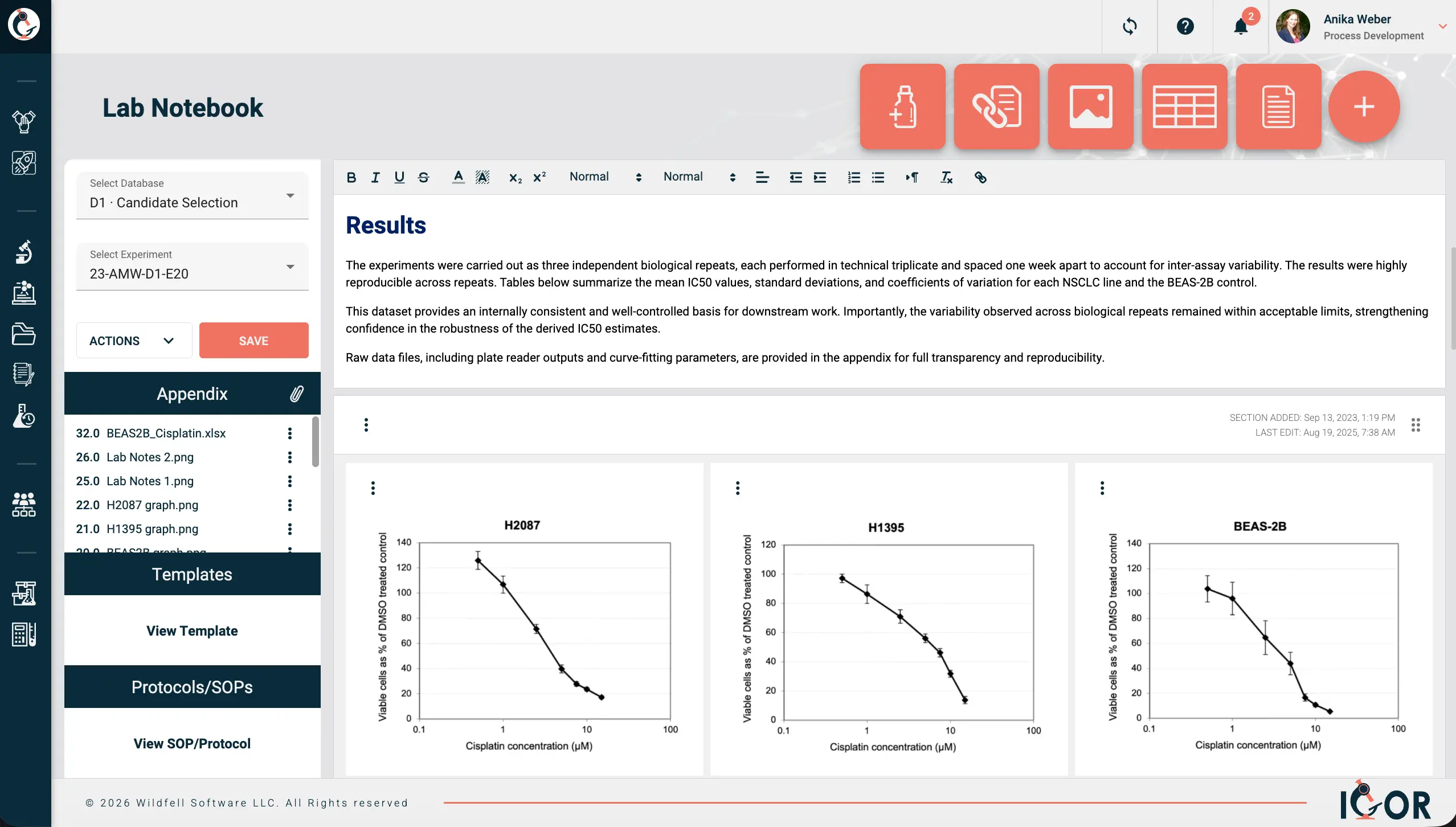
An electronic lab notebook (ELN) is software that replaces the paper lab notebook for documenting experiments. You document experiments the same way you would on paper (objectives, methods, observations, results), except the records are searchable, accessible to your whole team, and will be easy to find five years from now when someone needs to build on that work. The practical difference from just using Word docs or a shared drive is what runs underneath: immutable audit trails, full document version history, legally defensible electronic signatures. That's the compliance baseline. But a good ELN does more than tick regulatory boxes. It organizes your data around experiments rather than files, which sounds like a small thing until you're six months into a project and can actually find everything you need without digging through seventeen folders. Standardized templates keep documentation consistent across the team, and access controls mean you can actually open up collaboration with external partners without needing to worry about giving them access to sensitive data that they shouldn't see. IGOR is an example of an ELN that connects all of this in one place. Each notebook entry links to the protocol used, the samples and reagents involved, raw data, associated files, and the project it belongs to. Reagents and samples carry their own history too, so you can see exactly how they connect to other experiments and to each other. Anyone who has tried to replicate that with a shared drive knows how that story ends.
Read more: Electronic lab notebooks explained in detail.
Laboratory Information Management System (LIMS)
A laboratory information management system (LIMS) keeps track of samples and everything done to them. Where an ELN follows the scientist and the experiment, a LIMS follows the sample. Where did this sample come from, what tests were run on it, what were the results, and where did it end up? That chain of custody and workflow tracking is what a LIMS does well, and it's why you find them mostly in QC labs, manufacturing environments, and high-throughput testing operations where the same workflows run day after day. Some newer platforms combine LIMS and ELN functionality into a single system. IGOR is one of these, a cloud-based electronic lab notebook (ELN) and LIMS in one platform, so sample and inventory management sit right next to experiment documentation.
Read more: LIMS explained in detail.
Scientific Data Management System (SDMS)
A scientific data management system (SDMS) is the software that collects raw instrument files and keeps them in one place. Think of it as a structured filing cabinet for instrument output. An SDMS pulls files directly from your instruments (chromatograms, spectra, images), catalogs them, and makes them searchable. Everything stays in its original format, which matters when an auditor wants the raw data rather than just whatever summary ended up in your report. Many ELN or LIMS systems these days have SDMS functionalities built in.
Laboratory Execution System (LES)
A laboratory execution system (LES) guides technicians through a procedure one step at a time, enforcing the order and capturing data as they go. Think of it as an ELN for people who aren't supposed to improvise. Manufacturing and QC labs use these when SOPs must be followed to the letter, no exceptions.
Chromatography Data System (CDS)
Chromatography data systems (CDS) are the specialized software behind HPLC, GC, and similar instruments. It handles acquisition, peak integration, calibration curves, and results. Most plug directly into the instrument and talk to a LIMS on the back end for sample tracking.
Laboratory Information System (LIS)
A laboratory information system (LIS) is the clinical lab cousin of a LIMS. It is patient-centric instead of sample-centric: it talks to Electronic Health Record systems, receives test orders, and returns diagnostic reports. People use LIMS and LIS interchangeably sometimes, but the clinical context is the real distinction.
Quality Management System (QMS)
A quality management system (QMS) is the framework (and usually the software) that manages your quality policies: document control, change control, CAPAs, deviations, training records. Everything lives under this umbrella. If you have SOPs, you have a QMS of some kind. Whether it's any good is a separate conversation.
Electronic Quality Management System (eQMS)
An electronic quality management system (eQMS) is a QMS run in dedicated software instead of on paper. The functions are the same (document control, training records, deviations, CAPAs), but in software everything is connected and traceable in ways a spreadsheet or shared drive system simply can't match. Anyone who has prepared for an inspection on a paper-based system will appreciate the difference.
Enterprise Resource Planning (ERP)
Enterprise resource planning (ERP) is big corporate software for procurement, finance, and supply chain. Labs bump into ERP systems when ordering supplies or tracking costs. Not lab-specific at all, but it's part of the IT setup you work within, especially when someone asks why your purchase order is taking three weeks to process.
Graphical User Interface (GUI / UI)
A graphical user interface (GUI, or UI) is the visual layer you actually interact with: buttons, menus, dashboards, drag-and-drop elements. A badly designed GUI is one of the most common reasons lab software adoption fails. Scientists will tolerate a lot, but if the interface takes six clicks to do something that should take two, they'll go back to paper. When evaluating platforms, pay attention to how the UI feels during a basic, day-to-day task from a real workflow, not just during the polished vendor demo.
Lab Notebook Concepts
Experiment Entry
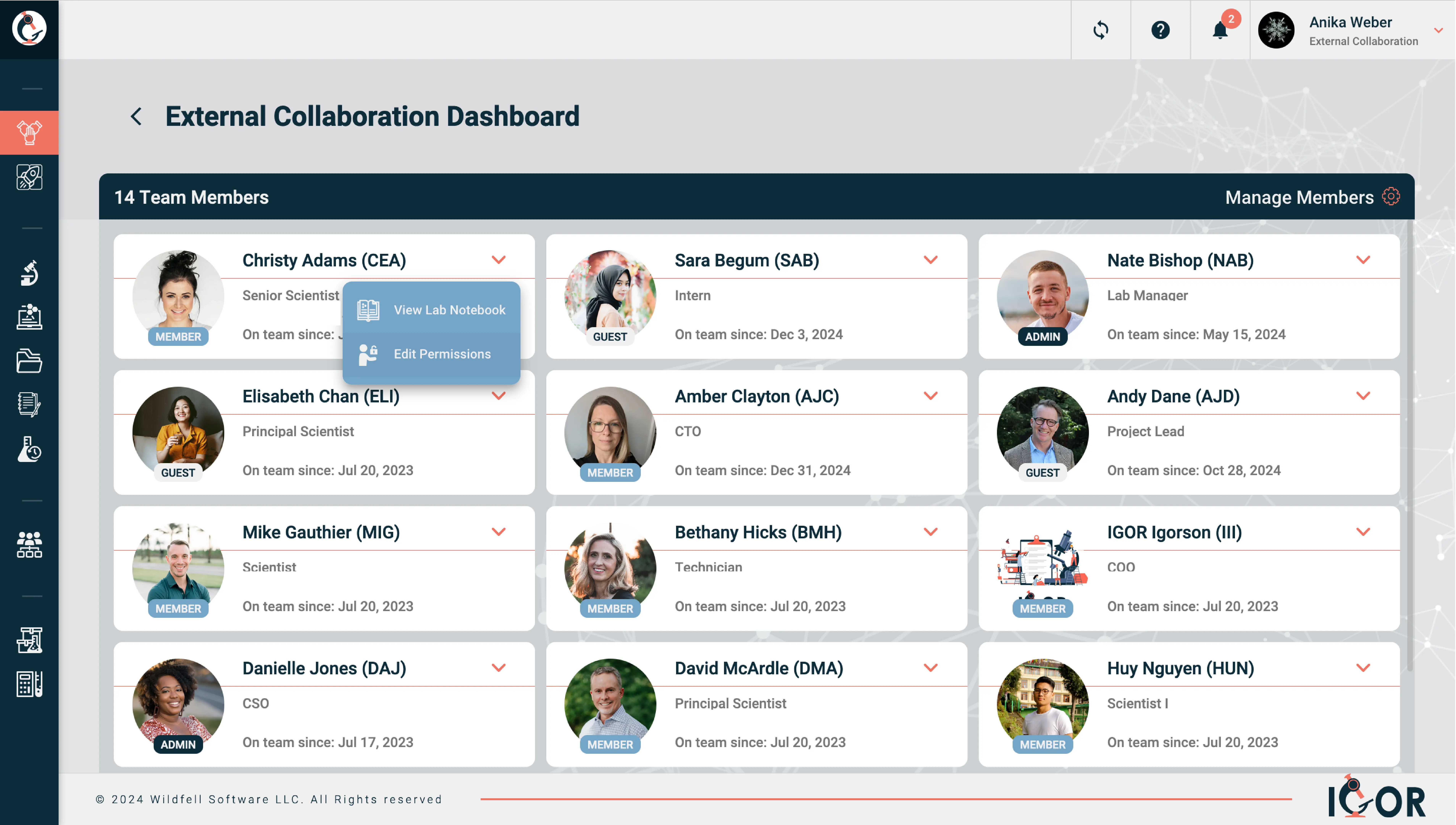
An experiment entry is one record in your ELN for one experiment or research activity. Title, date, objective, materials, method, results, observations. Like a notebook page, except there's no page limit and you can actually search it later. When you create a new experiment in IGOR, it assigns a unique Experiment ID and creates the notebook entry and a dedicated file folder for it.
Notebook Template / Experiment Template
Notebook templates (also called experiment templates) are predefined forms that set out how a particular experiment type gets documented. Every researcher on the team follows the same format, captures the same fields, and produces records that are actually comparable to each other. Without them, record formats drift from one person to the next, which creates real problems when you need to compare results across experiments or prepare for an audit. With IGOR's Template Generator you can divide a template into steps that match the stages of a procedure. Attaching a template to a notebook entry creates a copy, so the master template stays as it was.
Workspace
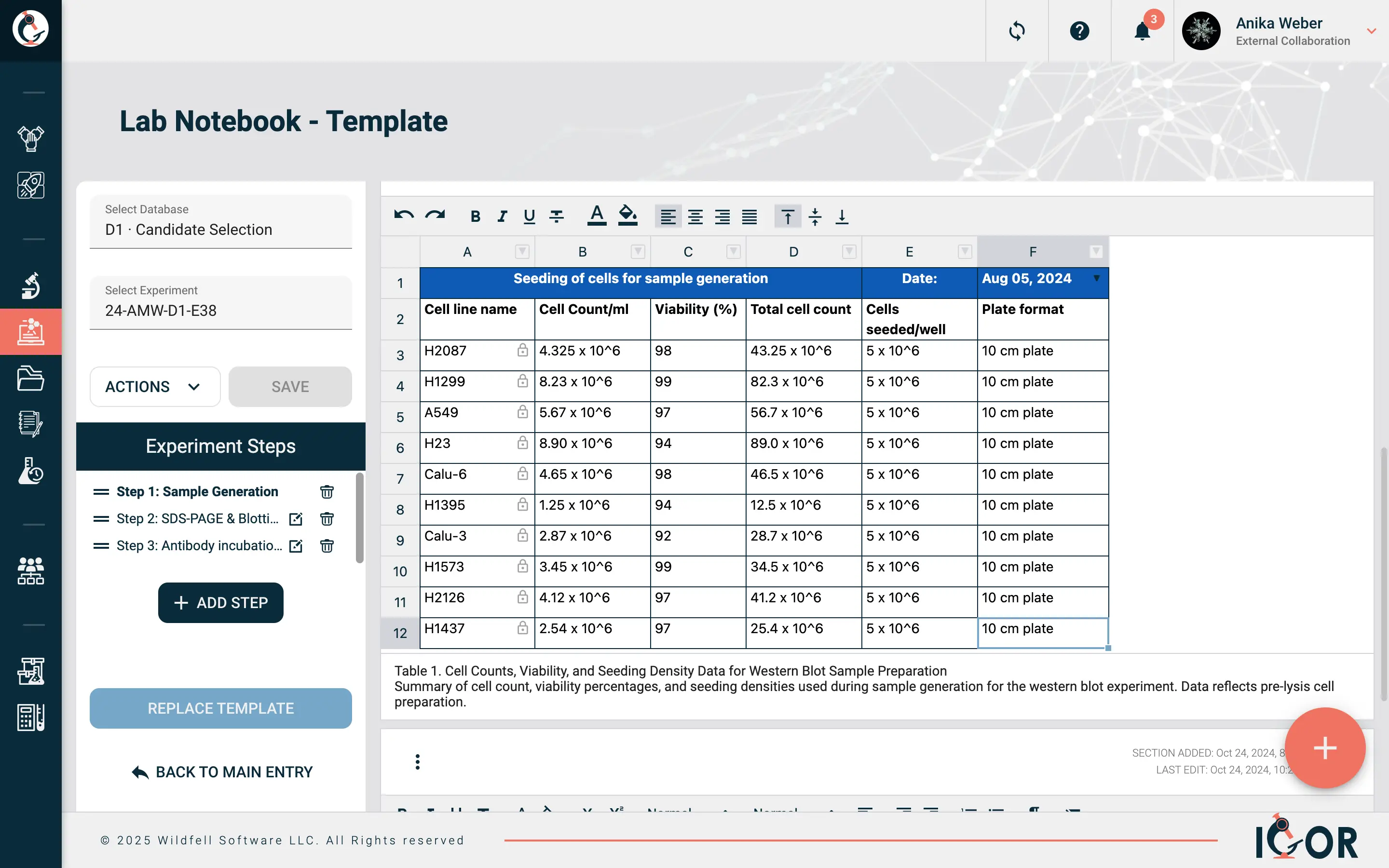
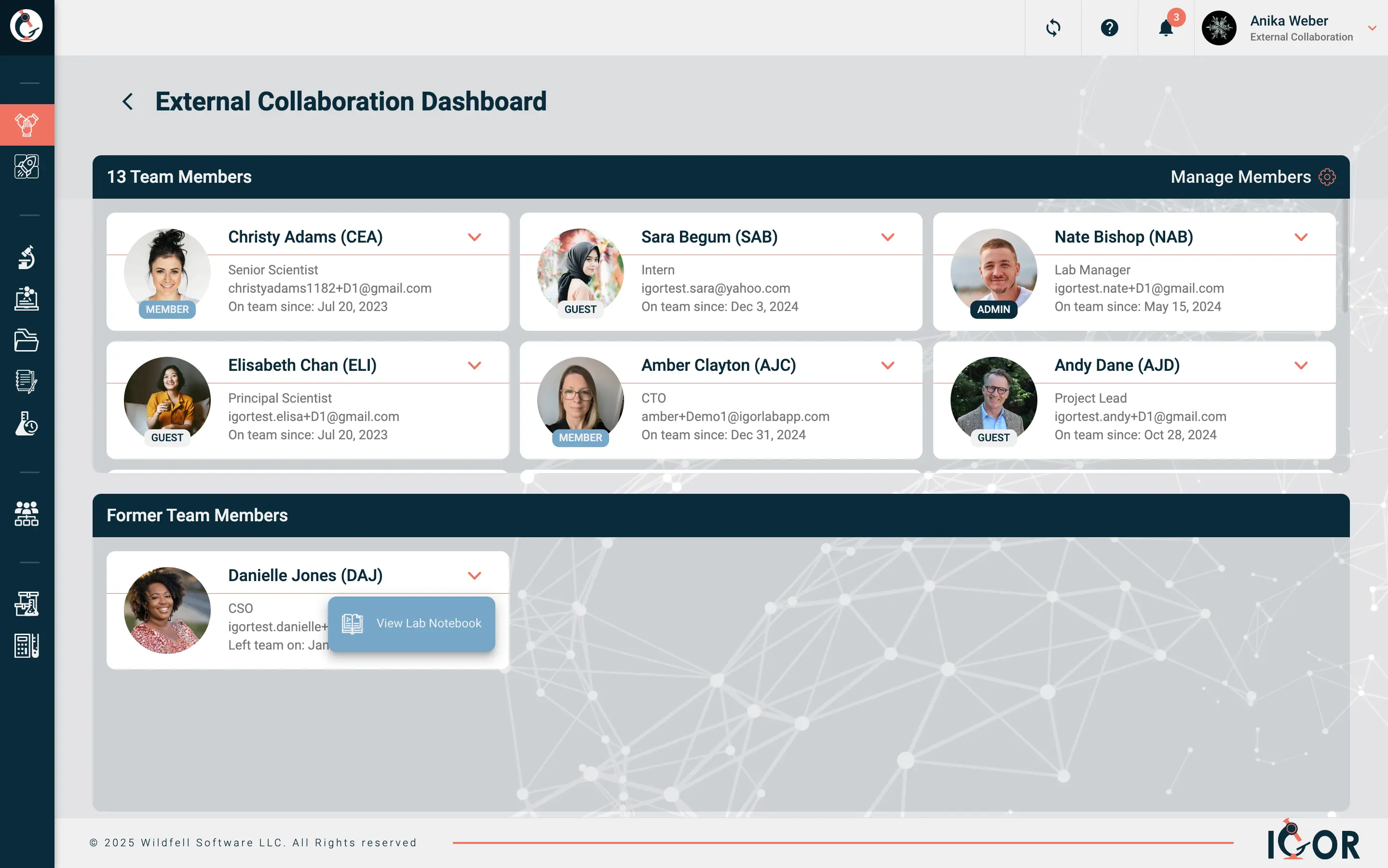
A workspace is a configurable area in an ELN where a team or project keeps its entries organized. Each one can have its own permissions, templates, and folder structure. Useful for keeping Project A's data separate from Project B without maintaining entirely separate systems. Many ELN and LIMS platforms operate on a single shared workspace for the whole organization. IGOR uses Collaboration Workspaces instead, where each team, department, or project gets its own environment with its own templates, permissions, and inventory, and can still share inventory, SOPs, and templates with other teams. Researchers can belong to multiple Collaboration Workspaces with different access levels in each, and external collaborators get access only to what's relevant to their project.
Witness / Countersignature
A witness signature, or countersignature, is a second signature from someone who isn't the author, confirming the entry has been reviewed. Important for IP (patent evidence) and for regulatory compliance. In an ELN, the witness signs electronically with their own credentials. The author signs first in IGOR and then assigns witnesses. How many witnesses each team needs is set by a Super Admin.
Read more: Witness signatures explained in detail.
Entry Locking
Entry locking is making a notebook entry read-only after it's finalized and signed. Amendments are still possible in most systems, e.g. appending notes or linked corrections, but they sit alongside the original rather than replacing it, and the audit trail captures any changes. For regulated labs this is a fundamental data integrity requirement. Once witnessing is complete, IGOR locks the entry permanently. Corrections go into a revision copy (suffix _R1, _R2), and the reason for each one is documented in the audit trail.
Rich Text / Free-Form Entry
A rich text or free-form entry is unstructured content in your ELN: formatted text, inline images, tables, sketches, attached files. As opposed to structured entry where you're filling in predefined fields. Most scientists want both, depending on what they're doing that day.
Cross-Referencing
Cross-referencing is linking one notebook entry to related records: other experiments, samples, protocols, instrument data. When it works well, an auditor can follow the thread from your experiment to the protocol, the reagents, and the raw data. Good cross-referencing is what makes it possible to reconstruct the full context of an experiment even months or years later.
Real-Time Collaboration
Real-time collaboration is the ability for multiple researchers to view, comment on, or contribute to the same records simultaneously. Think Google Docs, but for lab data. Matters a lot for multi-site teams or collaborations where people aren't physically in the same building. Not every ELN handles this well, so test it properly during any software evaluation.
Sample and Inventory Management
Sample Tracking
Sample tracking is following a sample from the moment it shows up (or gets created) through processing, testing, storage, and disposal. This is the core of what LIMS systems do. In platforms that combine LIMS and ELN functionality (like IGOR), you also get visibility into which experiments a sample was used in and how samples connect to each other across different studies. For labs running complex or long-running research programs, that broader view turns out to be genuinely useful.
Read more: Sample tracking explained in detail.
Chain of Custody
Chain of custody is the documented record of who handled a sample, when, and where, from collection to final analysis. It's how you prove that a sample's identity and integrity were maintained throughout. In forensics, environmental testing, and clinical labs this is particularly important, as a broken chain of custody can invalidate results entirely, regardless of how good the science was.
Read more: Chain of custody explained in detail.
Aliquot
An aliquot is a measured sub-portion of a sample. E.g. you pull 500 µL from your 10 mL stock for testing. A LIMS tracks parent-child relationships so every aliquot traces back to its source, even after you've split the sample four times. Aliquots in IGOR are recorded as child samples, with a relationship tree showing the lineage back to the parent.
Reagent Management
Reagent management is tracking what reagents you have, their lot numbers, storage locations, expiration dates, and which experiments used them. Sounds simple. It stops being simple when you discover someone's been running assays with an expired buffer for two weeks and nobody noticed.
Inventory Management
Inventory management is reagent management but bigger: it covers everything in the lab. Consumables, chemicals, biologicals, equipment, supplies. Quantities, locations, expiration dates, reorder levels, vendor info. In IGOR, inventory management connects materials directly to the experiments that use them, so you get traceability without extra data entry.
Read more: Lab inventory management explained in detail.
Storage Map
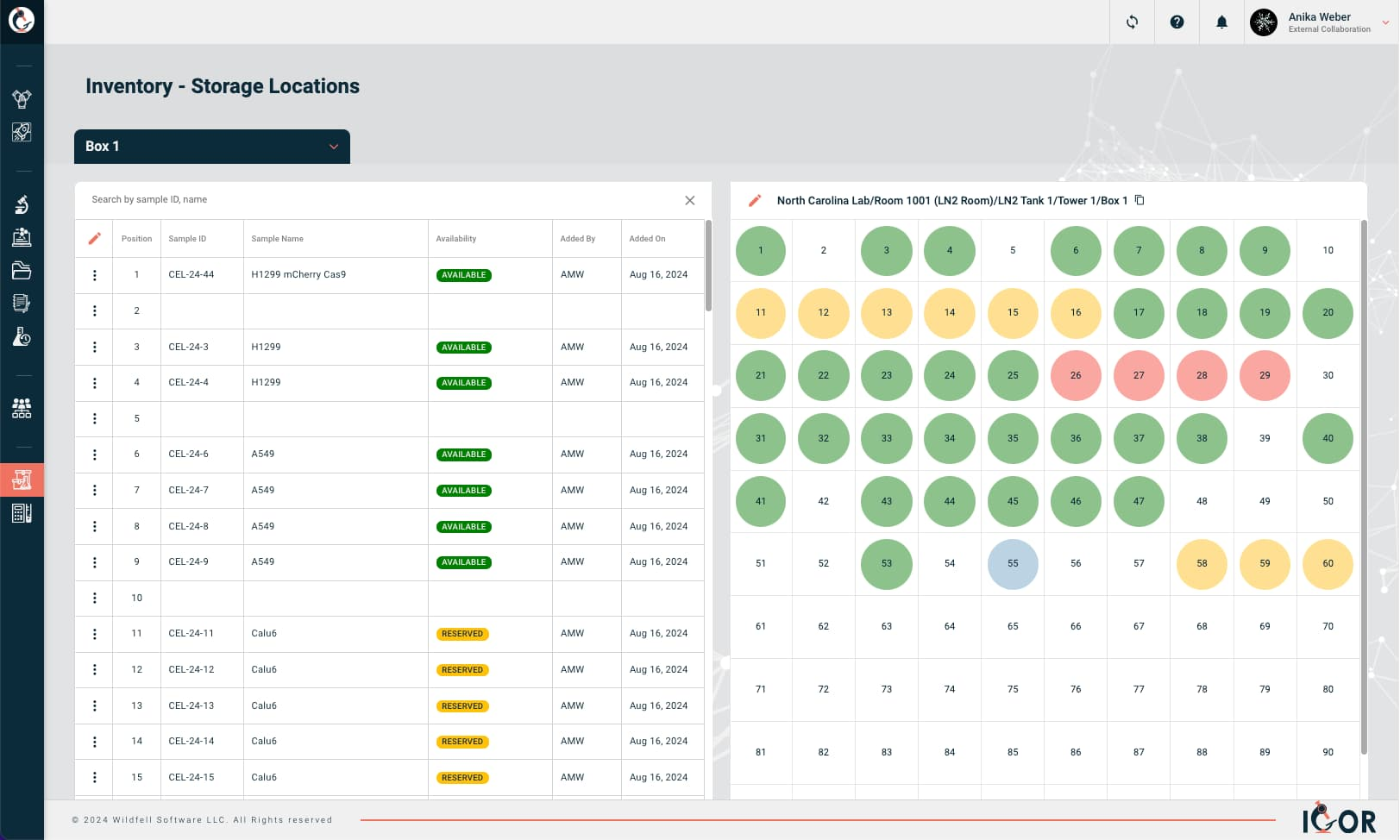
A storage map is a visual layout of where things physically live: building, room, freezer, shelf, rack, box position. Saves your sanity when you're hunting for a specific sample in a -80°C freezer on a Friday evening. Storage in IGOR is a nested hierarchy of Storage Locations (Facility, Site, Equipment, Location). Open a box in Box Map View and you get a color-coded grid with the status of every position.
Barcode / QR Code
A barcode or QR code is a machine-readable label for identifying samples, reagents, equipment, or storage locations. Scan it, pull up the record. Faster than typing, way fewer transcription errors. Every inventory item in IGOR gets a barcode linked to its Sample ID. Scan it with a standard 1D or 2D scanner and the full sample record opens, with every experiment the item was used in, the samples it's related to, and a history of every action taken on it, by whom and when.
Lot Number
A lot number is a manufacturer's identifier for a specific production batch. If that lot gets recalled, you need to know every experiment that touched it. Without tracking, that's a guessing game you'll lose.
Certificate of Analysis (CoA)
A certificate of analysis (CoA) is a document from a supplier confirming that a product met specifications. Shows test results, lot number, expiration. Regulated labs keep these on file. Filing them isn't exciting. Not having them when an auditor asks is worse.
Bill of Materials (BOM)
A bill of materials (BOM) is the complete list of materials and components needed for a specific process or product. Common in manufacturing where batch records have to document exactly what went into each run.
Reorder Point
A reorder point is the inventory level that should trigger a new order. Get it right and you never run out. Get it wrong and you find out at 9 AM on a Monday that nobody ordered competent cells and your cloning experiment is dead in the water. The IGOR term for this level is the notify threshold. When a tracked item crosses it, the people named for that item get an email, and IGOR lists the item in the Inventory Alerts tab in Mission Control.
Expiration Tracking
Expiration tracking is the automated alerting for reagents and consumables approaching their expiration dates. Without this, you get the classic audit finding: "expired reagent observed in active use." IGOR puts an alert on expired and soon-to-expire items, and you can filter your inventory to show only those flagged items.
Consumables
Consumables are single-use lab materials: pipette tips, tubes, plates, filters, gloves. Regulated labs may need to track consumable lot numbers. All labs benefit from knowing how fast they're going through things for budgeting and reorder purposes.
SOP and Protocol Management
Standard Operating Procedure (SOP)
A standard operating procedure (SOP) is a set of written instructions for doing a task the same way every time. Required in pretty much every regulated environment. The official answer to "how do we do this?", as opposed to "well, when I started here, Dave showed me and I've been doing it that way ever since." If you're interested in learning more about how to manage SOPs, check out our blog post Mastering Standard Operating Procedures in the Lab. SOPs in IGOR go through a formal review and approval workflow with electronic signatures. Only shared SOPs can be attached to experiments.
Read more: Standard operating procedures explained in detail.
Protocol
A protocol is a detailed plan for a specific experiment or study. More targeted than an SOP. The SOP tells you how to use the HPLC. The protocol tells you how to use the HPLC to answer your particular research question.
Version Control
Version control is tracking every change made to a document over time (who made it, when, and why), with each revision assigned a version number and the full history kept intact. "Which version of this SOP was in effect when that experiment was run?" is exactly the type of question auditors ask. For notebook entries, IGOR keeps a timestamped version from every save, and you can restore any earlier one.
Document Lifecycle
A document lifecycle is the set of stages a controlled document moves through: draft, review, approval, release, periodic review, revision, retirement. Document management systems enforce this so that only current, approved versions are available.
Effective Date
An effective date is the date a new or revised SOP officially takes over from the previous version. Work before this date follows the old version; work after follows the new one. Simple concept, but it trips people up during audits when dates don't align.
Periodic Review
Periodic review is going back to your SOPs on a schedule to confirm they're still accurate. Usually annual, sometimes every two years. "Periodic reviews not performed on schedule" is a surprisingly common audit finding. Nobody loves doing this work, but skipping it gets noticed fast.
Deviation
A deviation is any departure from what the SOP or protocol says should have happened. An instrument breaks, a step gets skipped, an incubation time goes on longer than it should have. Deviations happen in every lab. Failing to document them when they do is where the trouble starts.
Change Control
Change control is the formal process for making changes to processes, systems, or documents. Propose, evaluate impact, get approval, document. It exists to prevent well-intentioned changes from accidentally creating regulatory problems nobody anticipated.
CAPA (Corrective and Preventive Action)
CAPA (corrective and preventive action) is the quality process for fixing a problem and stopping it from coming back. Corrective action fixes the immediate problem. Preventive action deals with the root cause so it doesn't recur. Every quality system has a CAPA process. Whether it actually works depends on whether people dig into root causes or just document the obvious fix and move on.
Quality Assurance (QA)
Quality assurance (QA) is the overarching set of processes that make sure lab operations meet predefined quality standards before something goes wrong, as opposed to quality control (QC), which catches problems after the fact. QA integrates with LIMS and QMS to automate checks, enforce procedures, and maintain records. In practice, QA is the reason you have SOPs, training requirements, and periodic audits: it's the system that holds everything else accountable.
Data Integrity and Compliance
Data Integrity
Data integrity is the completeness, consistency, and accuracy of data across its whole lifecycle, from the moment it's recorded to the day it's archived or destroyed. That's the FDA's definition, from its 2018 data integrity guidance, and the same guidance uses ALCOA as the practical test. At the bench it comes down to one question. Could someone else trust your records, and reconstruct what you did, without asking you?
Read more: Data integrity explained in detail.
ALCOA
ALCOA is the five-attribute data integrity standard: Attributable, Legible, Contemporaneous, Original, Accurate. Five letters that follow you through your entire career in regulated science. The acronym is usually credited to Stan W. Woollen at the FDA in the 1990s, and regulators worldwide now reference it. The framework predates electronic records by decades, which is part of why it holds up so well: the principles apply whether you're writing in a paper notebook or entering data into a cloud-based ELN. Every data integrity inspection, warning letter, and audit finding traces back to one or more of these five attributes in some way.
ALCOA+ (ALCOA Plus)
ALCOA+ extends the original framework with four additional attributes: Complete, Consistent, Enduring, Available. Nine total. The "plus" additions address gaps that became more apparent as labs moved to electronic systems and data volumes grew. Complete covers the inconvenient results that sometimes go unrecorded. Enduring deals with long-term data preservation across software migrations and format changes. Available means being able to actually produce a record when asked, not just technically having it somewhere. When regulators review your records, these nine attributes are the lens they're using.
Read more: ALCOA+ explained in detail.
Attributable
Attributable means you can tell who generated a piece of data and when. In an ELN, that means authenticated logins and audit trail entries showing which user did what. On paper, initials and dates in permanent ink.
Legible
Legible means the record can be read and understood, today and years from now, by someone who wasn't involved in the work. If your handwriting is illegible or your file format is proprietary and the software no longer exists, you've got a problem.
Contemporaneous
Contemporaneous means data is recorded at the time the work is done. Not three weeks later from memory. Not from sticky notes you found in your lab coat. At the time of the activity, or close to it.
Original
Original means the first recording of the data is preserved. Copies can serve as the record, but only if verified as true copies. The raw file from your instrument is the original. The Excel table you made from those numbers is derived data.
A good illustration of how far this principle extends (pointed out to me by a good friend a few years ago): scribbling a cell count on your glove because there's no paper nearby technically makes that glove raw data. It should, strictly speaking, go in the lab notebook. Nobody is recommending that, of course, so best keep a small notebook at every bench instead.
Accurate
Accurate means the record matches what actually happened. Transcription errors, selective rounding, leaving out inconvenient results: all failures of accuracy. Sounds obvious until you see how routinely it goes wrong.
Complete
Complete means everything is recorded. Including the failed runs. Including the results that didn't fit your hypothesis. Including the controls that looked weird. Deleting inconvenient data is a serious integrity violation. Full stop.
Consistent
Consistent means related records agree with each other. Your notebook says Tuesday; the instrument log says Wednesday. That's a consistency problem.
Enduring
Enduring means records last for the whole retention period. Paper needs permanent ink, not pencil. Electronic records need to survive software upgrades, server migrations, and format obsolescence. If you can't open the file in fifteen years, you've failed this one.
Available
Available means you can actually produce the record when asked. Data on a backup tape in a warehouse that takes four weeks to retrieve doesn't meaningfully count as "available."
Audit Trail
An audit trail is the automatic, timestamped log of every action on a record. Who created it, who changed it, what changed, when. Can't be turned off by users. If your system lets people disable the audit trail or tamper with it, that's a red flag. The audit trail and review history of an IGOR notebook entry can be opened whenever you need them.
Read more: Audit trails explained in detail.
Electronic Signature
An electronic signature is the signer's legally binding mark on an electronic record. And it takes more than clicking "OK." Under Part 11, electronic signatures must be tied to the record they authenticate and include the signer's printed name, the date and time, and what the signature means (authored, reviewed, approved, etc.). Signing in IGOR means entering your initials and account password, and the electronic signatures are compliant with 21 CFR Part 11.
Read more: Electronic signatures explained in detail.
Metadata
Metadata is data about your data. Who created a record, when, on what instrument, under what conditions, which software version. Regulators hold metadata to the same integrity standards as the data itself.
Data Governance
Data governance is the set of organizational policies around data: who accesses it, how quality is maintained, retention schedules, disposal procedures. More management discipline than technology, but it matters a lot when something goes wrong.
True Copy
A true copy is a reproduction of an original record that has been verified to preserve its content, meaning, and context. A PDF export of an ELN entry with signatures and their dates intact can count, provided the copy is verified by a dated signature or produced through a validated process. A screenshot with metadata cropped out does not. Export a notebook entry from IGOR as a PDF and every page carries the Experiment ID, timestamps, and page numbers.
Regulations and Standards
21 CFR Part 11
21 CFR Part 11 is the FDA regulation that sets the criteria under which electronic records and electronic signatures are considered trustworthy, reliable, and equivalent to paper records and handwritten signatures. If your organization is FDA-regulated and uses electronic systems for GxP work, Part 11 defines the rules: audit trails, access controls, system validation, electronic signature requirements. It came into effect in August 1997, which means it was written well before cloud software, SaaS platforms, or most modern ELN and LIMS systems existed. The FDA's 2003 guidance on Part 11 scope and application narrowed how the agency enforces some of these requirements, but the regulation text itself has barely changed, and it still shapes how lab software gets selected, validated, and used across pharma, biotech, and medical devices. IGOR is compliant with 21 CFR Part 11. Whether your own studies are compliant also depends on your SOPs and validation.
Read more: 21 CFR Part 11 explained in detail.
EU Annex 11
EU GMP Annex 11 is the annex to the EU GMP guidelines that covers computerized systems. It has similar requirements to Part 11 (validation, data integrity, audit trails, electronic signatures) with differences in specifics. Sell into both markets and you need to satisfy both. The European Commission published a draft revision of Annex 11 for public consultation in July 2025, so check which version applies when you read this.
GxP
GxP is the catch-all for "Good Practice" regulations. The "x" changes: GLP, GMP, GCP, GDP. What they share is the idea that quality, safety, and data integrity need documented procedures and proper oversight.
GLP (Good Laboratory Practice)
Good Laboratory Practice (GLP) governs non-clinical lab studies that support regulatory submissions: how they're planned, run, monitored, recorded, archived, and reported. In the US, GLP for FDA-regulated products sits in 21 CFR Part 58, and internationally the OECD Principles of GLP play the same role. If your lab runs safety studies for pharma or agrochemical companies, GLP is your framework.
GMP (Good Manufacturing Practice)
Good Manufacturing Practice (GMP) sets the requirements for how pharmaceutical, biologic, and medical device products must be manufactured so they consistently meet quality and safety standards. Facility design, equipment, personnel, documentation, raw materials, production processes, QC: it covers the full picture. Researchers working in development often encounter GMP requirements earlier than expected, particularly when work starts transitioning toward clinical or commercial manufacturing.
GCP (Good Clinical Practice)
Good Clinical Practice (GCP) is the set of ethical and scientific standards for clinical trials. It protects trial participants and keeps trial data credible. If you've been involved in a clinical study as trial staff, you've probably sat through GCP training at some point. ICH E6 is the primary guideline.
ICH
ICH is the International Council for Harmonisation of Technical Requirements for Pharmaceuticals for Human Use. It develops guidelines meant to align requirements across the US, EU, Japan, and other markets. Their Q-series (quality), E-series (efficacy), and S-series (safety) get referenced by regulators globally.
ICH E6(R3)
ICH E6(R3) is the current version of the ICH guideline that governs how clinical trials are conducted, monitored, and documented. Participant protections, investigator responsibilities, data governance and audit trails all sit under it. E6(R3) was finalized by ICH in January 2025, took effect in the EU in July 2025, and was published by the FDA as final guidance in September 2025. The updates reflect how clinical research has changed, with far more electronic records and decentralized trial designs, and they take a harder look at data integrity throughout. If your work touches clinical trials at any point in the chain, your processes need to align with this one.
FAIR Data Principles
The FAIR data principles say scientific data should be Findable, Accessible, Interoperable, and Reusable. They were published in 2016 as a framework for making scientific data useful beyond its original experiment. The NIH Data Management and Sharing Policy has required data management and sharing plans since January 2023, and FAIR is the framework most funders reference when evaluating those plans.
FDA
The FDA (U.S. Food and Drug Administration) regulates food, drugs, biologics, medical devices, cosmetics, and tobacco. For lab scientists, FDA rules on documentation and data integrity determine how you work if it touches anything heading toward a submission or a manufacturing floor.
EMA
The European Medicines Agency (EMA) is the EU authority for evaluating medicinal products. It has been publishing increasingly specific guidance on data integrity, digital tools, and, more recently, AI use throughout the medicines lifecycle.
MHRA
The MHRA, or Medicines and Healthcare products Regulatory Agency, is the UK regulator. Independent from EMA since Brexit, with its own evolving framework. It published some of the clearest data integrity guidance in the industry and is currently developing its approach to AI regulation in healthcare.
PIC/S
PIC/S is the Pharmaceutical Inspection Co-operation Scheme, an international network of regulatory authorities publishing GMP inspection guidance. It doesn't carry legal force on its own, but it heavily influences how inspectors from member countries actually interpret GMP.
ISO/IEC 17025
ISO/IEC 17025 is the international standard for the competence of testing and calibration laboratories. Common in environmental, food safety, and forensic labs. It covers management and technical requirements like methods, equipment, and quality assurance.
Computer System Validation (CSV)
Computer system validation (CSV) is proving with documentation that a computerized system does what it's supposed to do, reliably. Write requirements (URS), test against them (IQ/OQ/PQ), document everything. Required for any GxP system. Frequently complained about. Still necessary.
Computer Software Assurance (CSA)
Computer software assurance (CSA) is the FDA's risk-based approach to software validation, developed for production and quality system software used in medical device manufacturing. The FDA issued it as draft guidance in 2022 and finalized it in September 2025. Rather than testing every system function to the same level of rigor, CSA directs effort toward the functions with the highest potential impact on patient safety and data integrity. It hasn't formally replaced CSV across all GxP environments, but it has shifted how many organizations think about where to focus their validation resources.
IQ/OQ/PQ
IQ/OQ/PQ stands for Installation Qualification, Operational Qualification, and Performance Qualification, the classic validation stages. Was it installed right? Does it work as specified? Does it perform under real conditions? If you've done system validation, you've lived these.
User Requirements Specification (URS)
A user requirements specification (URS) is a document that says what a system needs to do, from the user's perspective. The starting point for selection and validation. Skip this and you end up with software that technically works but doesn't actually do what your lab needs.
Validation Master Plan (VMP)
A validation master plan (VMP) lays out, at a high level, how your organization approaches validation overall. Scope, responsibilities, procedures, timelines. Individual system validations fit within this plan.
GAMP 5
GAMP 5 (Good Automated Manufacturing Practice) is ISPE's guide to validating computerized systems in GxP settings and the go-to framework for it. It uses software categories to scale validation effort to risk. The second edition came out in 2022 and started folding in CSA concepts.
Predicate Rules
Predicate rules are the underlying FDA regulations, such as GLP (21 CFR Part 58) and drug GMP (21 CFR Parts 210 and 211), that require records and signatures in the first place. Part 11 applies when you go electronic to meet those predicate rules. Knowing which predicate rules apply to your lab determines which Part 11 requirements matter to you.
Data Integrity Guidance
Data integrity guidance documents are regulator publications that interpret how ALCOA+ works in practice. The main ones to know: FDA's "Data Integrity and Compliance With Drug CGMP" (2018), MHRA's "GxP Data Integrity Guidance and Definitions" (2018), and WHO's "Guideline on Data Integrity" (TRS No. 1033, Annex 4, 2021), which replaced the earlier TRS 996 Annex 5 reference you'll still see cited in older documents. The MHRA document remains the most readable starting point. Warning letters from the FDA are worth reading alongside these, because they show where the theory meets actual inspection findings.
Warning Letter
A warning letter is a public letter from the FDA telling a company it has significant violations. Data integrity failures, missing audit trails, inadequate validation show up constantly. Warning letters are searchable on the FDA website. Uncomfortable reading, but educational.
Access and Security
Role-Based Access Control (RBAC)
Role-based access control (RBAC) is restricting what users can do based on their assigned user role. A bench scientist creates and edits entries. A supervisor approves. An admin configures templates. Nobody does everything. This is how you prevent both accidental and intentional data integrity problems.
Single Sign-On (SSO)
Single sign-on (SSO) is one set of credentials for multiple systems. Your company login gets you into the ELN, the LIMS, and whatever else is connected. Simpler for users, easier for IT, more secure than everyone juggling separate passwords across ten systems.
Multi-Factor Authentication (MFA)
Multi-factor authentication (MFA) is logging in with more than just a password: a password plus a code from your phone, or a hardware token. Increasingly the expectation for any system with sensitive research or patient data. In IGOR, a Super Admin turns MFA on for the whole organization from Company Settings.
Data Sovereignty
Data sovereignty is the principle that data is governed by the laws of the place where it's physically stored. Pick a cloud provider with servers in another country and that country's regulations may apply to your data, regardless of where your company sits. Real consideration for multinational labs choosing cloud platforms. EU and UK-based researchers, or those sharing data with partners in those regions, also need to factor in GDPR compliance when evaluating where their research data is stored and who can access it.
Institutional Data Ownership
Institutional data ownership means research data belongs to the institution, not to individual researchers. When a postdoc leaves, their notebook data stays behind. Sounds obvious until someone departs and you realize all their experiments lived in a personal Dropbox folder or some free ELN account (which is generally tied to the individual). An institutional ELN makes this a non-issue. Anything entered into IGOR belongs to your organization rather than the person who typed it, and it stays accessible after they leave.
Integration and Interoperability
API (Application Programming Interface)
An API (application programming interface) is how different software systems talk to each other. Your ELN talks to your LIMS, your LIMS talks to your instruments, and data moves between them through APIs without anyone retyping numbers into a spreadsheet.
Instrument Integration
Instrument integration is connecting instruments directly to your informatics systems so data flows automatically. The alternative is transcribing numbers from a screen into your notebook by hand, which can be slow and error-prone.
Middleware
Middleware is software that translates between instruments and informatics systems. You see it a lot in clinical labs where twenty different analyzer models from five different manufacturers all need to feed into one LIS.
Data Export
Data export is getting your data out of a system in a usable format. Matters for regulatory submissions, vendor switches, and long-term preservation. If your ELN traps data in a proprietary format with no export, that's vendor lock-in, and it'll cost you eventually. IGOR lets you export your own notebook entries, protocols, inventory data, and files whenever you want, without needing anyone at IGOR to do it for you.
FAIR Compliance
FAIR compliance is how well your data management aligns with the FAIR principles. Grant agencies are paying increasing attention. NIH has required data management and sharing plans since January 2023, and FAIR is the framework most funders reference.
Webhook
A webhook is an automated notification from one system to another when something happens. Your LIMS pings your project management tool when a sample test finishes, for instance. Lighter than constantly polling an API.
Data Lake / Data Warehouse
A data lake or data warehouse is a centralized repository where you aggregate data from multiple sources (ELN entries, LIMS results, instrument files) for cross-study analysis or machine learning. More common at big organizations, but the concept is trickling down as AI tools make aggregated data more useful.
Emerging Terms
AI/ML in Lab Software
AI/ML in lab software refers to artificial intelligence and machine learning features built into ELN, LIMS, and analysis platforms, and most lab software now has them in some form. The useful end of the spectrum includes things like natural language search, automated data extraction from instrument outputs, and pattern recognition across large experimental datasets. The other end is mostly rebadged existing functionality with "AI-enabled" added to the product page. When evaluating platforms, ask how AI-generated or AI-assisted content fits into your data integrity framework. That matters more than the list of AI tools. That's an area the industry is still figuring out, and for regulated labs the stakes of getting it wrong are significant.
Generative AI
Generative AI is AI that creates new content (text, code, images) from patterns in its training data. In the lab context, that means tools like ChatGPT or Claude being used to draft documentation, summarize results, help with analysis, etc. Useful, but it raises data integrity questions that most labs haven't figured out yet.
Hallucination (AI)
A hallucination is when an AI writes something that reads as confident and specific but is factually wrong. In lab documentation, that could mean an invented reference, a fabricated method step, a result that doesn't match your actual data. Looks fine on the surface. The content though is fiction. As of 2026, this still happens often enough with current AI tools that assuming accuracy is the wrong default. Every AI-generated statement in a regulated record needs verification against source data.
Model Drift
Model drift is when an AI's behavior shifts over time because the underlying model got updated or the data it encounters has changed. Matters if you're using AI for analysis: the same input might give slightly different output after a model update, and you might not even know the update happened.
Digital Twin
A digital twin is a virtual replica of a physical process or system. In pharma manufacturing, digital twins simulate production so you can predict outcomes and tweak parameters without running actual batches. More common at big manufacturers right now, but the concept is expanding.
Cloud-Based / SaaS (Software as a Service)
Cloud-based software, or SaaS (software as a service), is software delivered over the internet on a subscription basis. You access it through a browser; the vendor handles infrastructure, updates, security patches, and backups. Most modern ELN and LIMS platforms work this way now. The pitch is real: lower upfront costs than buying servers, no in-house IT team needed to maintain the system, automatic updates so you're always on the current version, and the ability to scale storage as your data grows. The trade-off is that your data sits on someone else's infrastructure, which makes data sovereignty and vendor lock-in worth thinking about before you sign. IGOR works this way and is hosted on AWS.
On-Premise
On-premise software is software installed on your own servers. Maximum control over data and infrastructure, but you own the maintenance, updates, security, and keeping everything running. Some regulated organizations still require this for their most sensitive data.
Hybrid Cloud
A hybrid cloud is a mix of your own servers and the cloud: sensitive data on your own servers, less sensitive functions in the cloud. A compromise between full control and full convenience without committing entirely to either.
Blockchain (in Lab Context)
Blockchain, in a lab context, is distributed ledger technology applied to lab data. The pitch is that recording data hashes on a blockchain creates immutable proof that records haven't been tampered with. Still very early days for lab use. Interesting for high-stakes data integrity situations, but not widely adopted and probably won't be for a while.
We wrote this glossary as a general overview for lab scientists, and it isn't formal regulatory or legal advice. Before acting on anything here, check the current text of the regulation or guidance that applies to your work and bring in your QA or regulatory team.

This glossary is maintained by the team at IGOR. We update it as new terms emerge and regulatory guidance changes. Think we missed something? Let us know.
If you'd like to see witnessing, entry locking, audit trails, and sample lineage working together in IGOR, book a demo whenever it suits you.
Frequently asked questions
What is the difference between an ELN and a LIMS?
An electronic lab notebook (ELN) documents experiments and is built around the scientist and the work, while a laboratory information management system (LIMS) tracks samples and is built around the sample and its workflow. So the ELN holds what you did and why you did it: the objective, the method, the raw data, the observations, and who signed the entry. The LIMS answers a different question about every tube in the freezer: where did this sample come from, and where is it now? A LIMS is the classic fit for QC and high-throughput testing labs, where the same workflows run day after day on hundreds of samples. Research labs usually need some of both, because a notebook entry is only traceable when it records which aliquot or reagent lot went into the experiment. Running two separate systems means copying sample IDs from one to the other by hand, which is why some platforms now combine the ELN and the LIMS in one system.
Is IGOR an ELN or a LIMS?
IGOR is a cloud-based electronic lab notebook (ELN) and LIMS in one platform. Notebook entries, SOPs and templates sit in the same system as the lab inventory, so a notebook entry links directly to the samples and reagents used in it. Each sample record carries its barcode, storage location and parent and child samples.
What is the difference between an audit trail and version history?
An audit trail is the log of every action on a record, and version history is the set of saved states of the record itself, so the audit trail tells you who did what and when, and the version history shows you what the entry looked like at each point. The two answer different questions. When a reviewer asks who changed a dilution from 1:500 to 1:1000 and on which day, the audit trail answers it. When you need to see the whole entry as it stood before that change, with the old table and the old figure, you open the earlier version. A good ELN keeps both automatically, and users can't switch either one off or edit it. In IGOR, every save of a notebook entry creates a timestamped version you can restore, and the entry's audit trail and review history can be opened at any time.
What does ALCOA+ stand for?
ALCOA+ stands for Attributable, Legible, Contemporaneous, Original and Accurate, plus Complete, Consistent, Enduring and Available. The first five are the original ALCOA, usually credited to Stan W. Woollen at the FDA in the 1990s. The WHO's 2021 guideline on data integrity uses all nine to judge whether GxP data can be trusted.
What is the difference between CSV and CSA?
Computer system validation (CSV) is the traditional approach of documenting that a computerized system does what it is supposed to do, often by writing requirements and then testing every function to the same depth through IQ, OQ and PQ scripts. Computer software assurance (CSA) is the FDA's risk-based approach, which puts the most testing effort on functions that could affect product quality, patient safety or data integrity and much less on low-risk ones. FDA finalized its guidance on Computer Software Assurance for Production and Quality System Software in September 2025, and its scope is software used in medical device production and quality systems under 21 CFR Part 820. So CSA changes where the validation effort goes, and GxP systems still have to be validated. In practice, a team working the CSA way might test a report layout with a quick unscripted check and keep fully scripted, documented testing for the calculation that decides whether a batch is released.
Is an electronic signature legally equivalent to a handwritten one?
Under FDA rules, yes: 21 CFR Part 11 treats an electronic signature that meets its requirements as the legally binding equivalent of a handwritten signature. Section 11.100(c) requires the organization to certify this to the FDA, prior to or at the time of first use, in a letter signed by hand. The signed record has to show the signer's printed name, the date and time, and the meaning of the signature, such as authorship or approval (11.50), and the signature must be linked to its record so it can't be copied onto another one (11.70). The EU works differently. Under Article 25 of the eIDAS Regulation, a qualified electronic signature has the same legal effect as a handwritten one, and other electronic signatures can't be refused as evidence just because they're electronic. Signing a notebook entry in IGOR means entering your initials and account password, and IGOR's electronic signatures are compliant with 21 CFR Part 11.
References
[1] U.S. Food and Drug Administration. 21 CFR Part 11, Electronic Records; Electronic Signatures. Electronic Code of Federal Regulations. https://www.ecfr.gov/current/title-21/chapter-I/subchapter-A/part-11
[2] U.S. Food and Drug Administration (2003). Part 11, Electronic Records; Electronic Signatures: Scope and Application. Guidance for Industry. https://www.fda.gov/regulatory-information/search-fda-guidance-documents/part-11-electronic-records-electronic-signatures-scope-and-application
[3] U.S. Food and Drug Administration (2018). Data Integrity and Compliance With Drug CGMP: Questions and Answers. Guidance for Industry. https://www.fda.gov/regulatory-information/search-fda-guidance-documents/data-integrity-and-compliance-drug-cgmp-questions-and-answers
[4] Medicines and Healthcare products Regulatory Agency (2018). GxP Data Integrity Guidance and Definitions. https://www.gov.uk/government/publications/guidance-on-gxp-data-integrity
[5] World Health Organization (2021). Guideline on data integrity. WHO Technical Report Series No. 1033, Annex 4. https://cdn.who.int/media/docs/default-source/medicines/norms-and-standards/guidelines/inspections/trs1033-annex4-guideline-on-data-integrity.pdf
[6] U.S. Food and Drug Administration (2025). Computer Software Assurance for Production and Quality System Software. Guidance for Industry and FDA Staff. https://www.fda.gov/regulatory-information/search-fda-guidance-documents/computer-software-assurance-production-and-quality-system-software
[7] International Council for Harmonisation (2025). E6(R3) Guideline for Good Clinical Practice. https://www.ich.org/page/efficacy-guidelines
[8] European Commission. EudraLex Volume 4, Annex 11: Computerised Systems. https://health.ec.europa.eu/medicinal-products/eudralex/eudralex-volume-4_en
[9] Regulation (EU) No 910/2014 (eIDAS), Article 25. https://eur-lex.europa.eu/eli/reg/2014/910/oj